Why do so many apps ship with a subpar media viewing experience? For example, on Instagram, you can pinch to zoom on an image but it bounces back to its original size after you let go. Same goes for Retro, which has an arguably even worse implementation because it constrains the zoom to the UI chrome surrounding it, limiting the amount of real estate afforded to media 1.
This approach is cheap and simple enough to implement. You can register a UIPinchGestureRecognizer on some UIImageView and manually transform its scale and position with CGAffineTransform. When the pinch gesture ends, we can use UIView.animate() to animate the image back to its .identity transform.
let pinchGesture = UIPinchGestureRecognizer(
    target: self,
    action: #selector(handlePinch)
)
someImageView.addGestureRecognizer(pinchGesture)

@objc func handlePinch(_ gestureRecognizer: UIPinchGestureRecognizer) {
    let view = gestureRecognizer.view!
    let point = gestureRecognizer.location(in: view.superview)
    let dx = point.x - view.center.x
    let dy = point.y - view.center.y

    let scale = max(0.5, gestureRecognizer.scale)

    // Scale and translate image as long as
    // gesture is active
    view.transform = CGAffineTransform(
        a: scale, b: 0, c: 0, d: scale,
        tx: dx * (1 - scale),
        ty: dy * (1 - scale)
    )

    // Once gesture ends or is cancelled,
    // return image view to original transform
    if gestureRecognizer.state == .ended ||
       gestureRecognizer.state == .cancelled
    {
        UIView.animate(withDuration: 0.2) {
            view.transform = .identity
        }
    }
}
But I want to be able to tap on an image to go into some full screen image viewer experience. I also want to take that pinch and zoom gesture further, and have the image gracefully transition into a fullscreen view when the gesture ends, that affords me full control over zooming and panning the image around. This is where the implementation becomes non-trivial.
This is because we need some way for the image to cross the boundary between some ViewControllerA and another FullScreenViewControllerB, because each view controller owns a separate view hierarchy. So the image must appear to transition and animate from its original state in one hierarchy to its fullscreen state in the other, and vice versa.
A common trick we can use for views crossing this boundary relies on snapshotting the source view to create a clone, hiding the source, and animating the clone's position + scale from one view to the other.
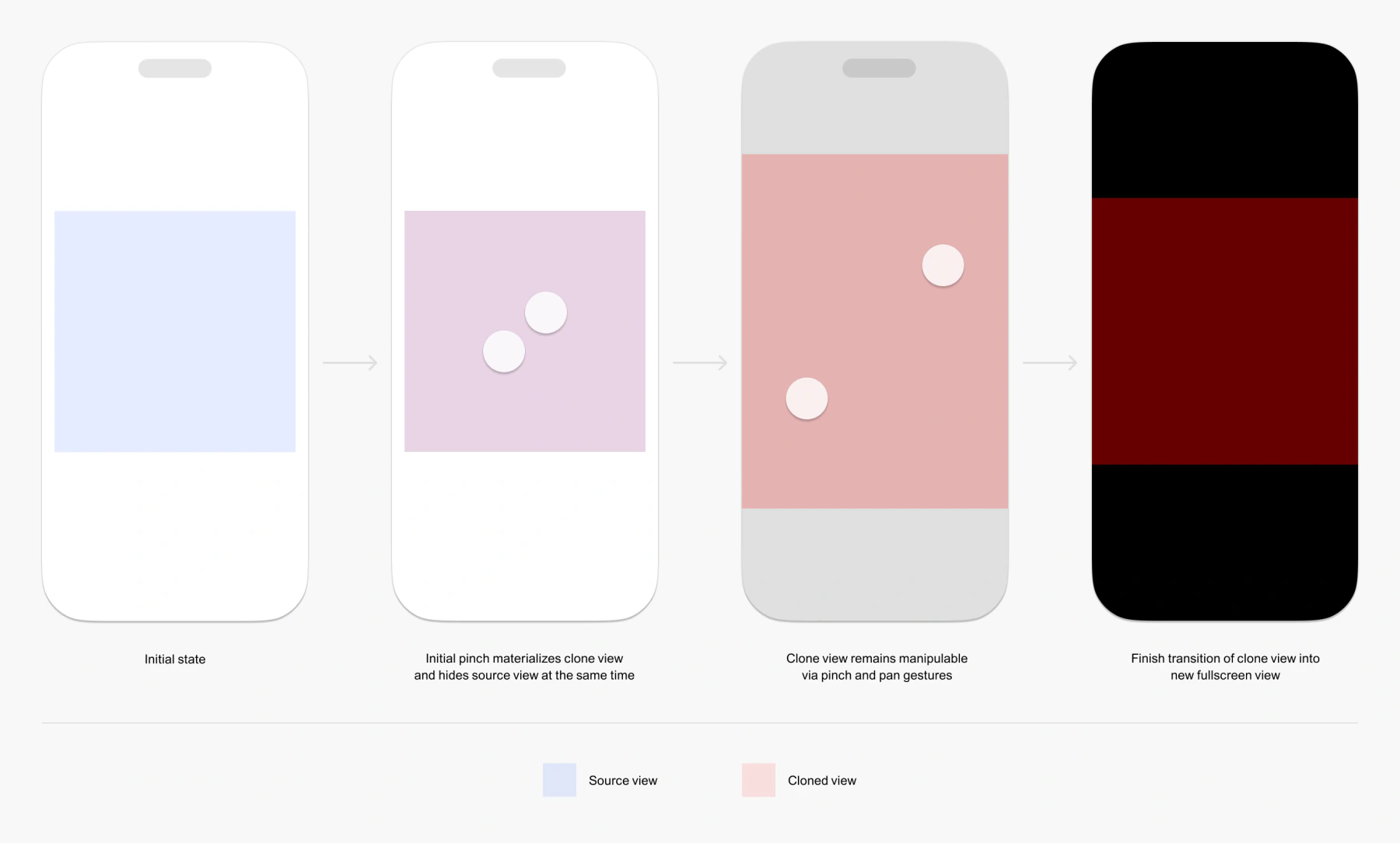
This would suffice for static images, but what about GIFs? We run into two issues:
- If we use the same snapshot mechanism to capture the GIF at the time of pinch, it would remain static for the duration of the transition
- We could clone the GIF entirely, but this might require a second unnecessary decode and...
- ...without additional bookkeeping, we lose the synchronization of playback with the source GIF the moment the clone GIF materializes, resulting in visual discontinuity
One way to fix this is with a _UIPortalView. It is essentially a live window into some source view, and continuously mirrors it for as long as the source remains alive and renderable. Though it's a private API, its behavior has been explored extensively 2, and is exactly what we need for the purposes of this exercise.
When the pinch gesture begins, we instantiate a _UIPortalView that mirrors the source image and starts exactly over where it is in some ViewControllerA, and the source is hidden 3 such that the mirror clone convincingly masquerades as the source. The portal view scales and moves as our fingers pinch and pan across the screen. When the gesture ends, the portal view animates into a fullscreen aspect-fit frame within some FullScreenViewControllerB, while the backdrop fades to black.
To implement this hand off of the portal view traversing into the fullscreen view, the moment the pinch gesture ends, we record and convert the portal's screen-space scale and center into an equivalent UIScrollView zoomScale and contentOffset (because we'll be using a UIScrollView for the fullscreen view), preserving the image's visible size and center point before reparenting it into the fullscreen view with portal.removeFromSuperview() and some fullscreenView.addSubview(portal), and reapplying the captured center and transform.
The FullScreenViewControllerB uses a UIScrollView to drive the zoom and pan gestures, instead of a plain UIPanGestureRecognizer + UIPinchGestureRecognizer combo, because the native scroll view provides the following that we would have to otherwise implement ourselves:
- Baked in pinch and pan gestures
- Double-tap zooming around a point
- Velocity and inertial deceleration when panning/swiping
- Rubber-banding when panning beyond edges
To return to some ViewControllerA, we can either pan/swipe from the image and out of FullScreenViewControllerB...
...or pinch to zoom...
...but only when the image is at its original 1x scale. This is because, if a gesture first zooms the image in and later we zoom it out and the scale crosses below 1x, we do not want to interpret that as a dismissal, but as an intent to return the image to its original scale first.
An additional benefit to using _UIPortalView is that it's agnostic out of the box with regards to the type of views it mirrors. So beyond images or gifs, it could probably work with videos or just plain UIViews, though I haven't tested this.
If you're curious, here's a gist of what the overall flow could look like.
I'm sure some of these were product decisions. Still...
See Unrestricted View Replication, _UIPortalView: From Live Mirroring to Liquid Glass-Style Effects, and the private API documentation itself.
But actually, we don't want to simply toggle .hidden on the source image or make its alpha 0, because that would also make the portal clone hidden, as the portal is a symbolic link to the source of rendered content in the render tree. To get around this, we need to access the private hidesSourceView option on the _UIPortalView as well and toggle it on.